Subscription & billing
Salonnare offers three plans so you can pick the one that suits your salon best. You can start for free and upgrade when you're ready.
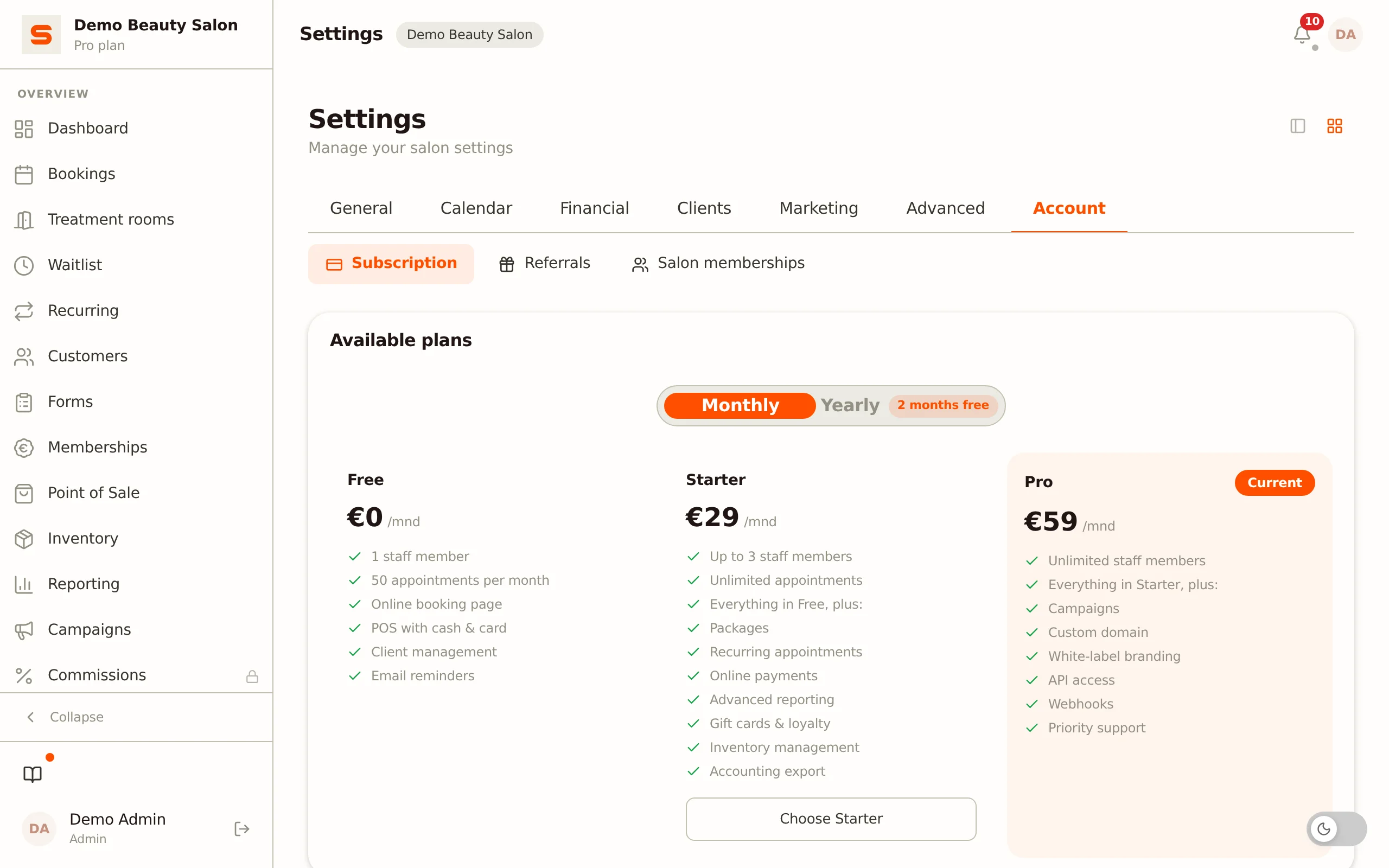
You'll find everything under Settings > Subscription.
The three plans
Free
- 1 staff member
- Up to 50 bookings per month
- Point of sale (POS), online booking and client management
- Google Business Profile, Google reviews and referrals
Starter
- Up to 3 staff members
- Unlimited bookings
- Everything in Free, plus reports, gift cards, loyalty, inventory, packages, promotions, recurring appointments, online payments, accounting export, waitlist, marketplace, intake forms and no-show fees
Pro
- Unlimited staff
- Unlimited bookings
- Everything in Starter, plus email campaigns, white-label (custom branding), memberships and deposits
Not sure which plan you need? Start with Free. You can always upgrade later without losing any data.
Beta: Pro for everyone who signs up now
Salonnare is in beta. Anyone can sign up, no invitation needed. Everyone who registers during the beta automatically gets Pro, at no cost and without payment details. You don't need to choose a plan during registration; the wizard shows that you get Pro instead.
It's a beta, so you may still run into bugs. That's why you get the Send feedback button with the bug icon (in the sidebar, in the menu behind your initials and on mobile under More). A notice at the top of the app says so too; you can close it.
While the beta runs, your Pro has no end date. When the beta ends, you get 3 more months of Pro for free, counted from that moment. We'll let you know in good time. You'll get an email fourteen days before those 3 months end. If you don't choose a plan after that, your salon returns to Free; your data stays where it is.
Early access: Pro at no cost
If you signed up for early access and were invited, your salon automatically gets Pro when you register, at no cost and without payment details. You don't need to choose a plan during registration.
As an early-access member you also have the Send feedback button with the bug icon (in the sidebar, in the menu behind your initials and on mobile under More). Use it to report anything you notice straight away; it helps us make Salonnare better.
For now your Pro has no end date. At a later moment we start the free period that belongs to your signup (3 or 12 months, counted from that moment). You'll get an email fourteen days before it ends. If you don't choose a plan after that, your salon returns to Free; your data stays where it is.
Paying monthly or yearly
At the top of the plans list you switch between Monthly and Yearly. Paying yearly gets you two months free.
The two payment types differ in how you pay and cancel:
- Monthly (SEPA direct debit) -- You enter into a 12-month contract with monthly automatic direct debit. After that, the contract renews automatically for another 12 months unless you cancel.
- Yearly (prepaid) -- You pay for the whole year up front. The subscription does not renew automatically; at the end of the year it stops unless you subscribe again.
Upgrading your plan
- Go to Settings > Subscription.
- Choose Monthly or Yearly at the top.
- Click Choose Starter or Choose Pro.
- You're redirected to a secure Stripe payment page. Enter your details and pay the first term with iDEAL or card. If you pay with iDEAL, Stripe records the mandate for the following terms from that same payment -- you don't need to enter your IBAN separately.
- After payment your new plan is activated immediately.
On the Stripe payment page you can enter your VAT number. With a valid business VAT number, VAT is reverse-charged where applicable.
Viewing your current plan
On the Settings > Subscription page you see at a glance:
- Current plan -- Which plan you have (with a "Current" label on the card).
- Contract period -- The start and end date of your 12-month contract (if you have a paid plan).
- Limit warning -- When you approach your plan's limit (80% of the number of staff or bookings), Salonnare shows a notice at the top with an upgrade hint.
Managing invoices and payment method
If you have a paid plan, the Manage subscription button (Stripe customer portal) appears:
- Go to Settings > Subscription.
- Click Manage subscription.
- In the secure Stripe portal you can update your payment method and download past invoices.
Cancelling your subscription
In the Contract block with your contract period you'll find the Cancel button:
- Click Cancel and confirm with Yes, cancel.
- You keep full access until the end of your contract period.
- After that your account is reset to the Free plan. No data is deleted.
Changed your mind? As long as the contract is still running you can undo the cancellation with Undo cancellation.
With monthly SEPA payment, your 12-month contract runs until the end date -- cancelling only stops the automatic renewal afterwards. With yearly prepaid, the subscription stops automatically on the end date.
If you drop back to Free, features that aren't part of Free are locked; your data is kept. Existing staff keep working as normal, but as long as you're above your plan's staff limit you can't add new staff. See Managing staff.