Privacy and GDPR
As a salon owner you work with personal information every day -- names, phone numbers, email addresses, appointment details, and sometimes sensitive health notes. Salonnare is built to help you manage this data responsibly and comply with privacy regulations such as the GDPR.
Don't worry -- you don't need to be a legal expert. This guide explains the practical tools at your disposal. There are two levels of export: per individual client (from the client detail view) and for your entire salon (from Settings).
What is the GDPR?
The GDPR (General Data Protection Regulation) is a European privacy law that gives people control over their personal data. In short, your clients have the right to:
- Know what data you hold about them.
- Get a copy of their data.
- Ask you to delete their data.
Salonnare gives you the tools to handle these requests in a few clicks.
Exporting one client (access request)
When a client asks "What data do you have about me?", you export the full record of that single client. This happens in the client detail view:
- Go to Customers and open the client's profile.
- Click the Export button (with the download icon). This button is only visible to administrators.
- A JSON file is downloaded named
export-klant-<id>-<date>.json. - Send this file to the client.
What's in the client export?
The export bundles everything linked to that client:
- The full client record (contact details, date of birth, address, notes).
- All appointments and their status.
- Colour formulas and labels.
- Loyalty transactions and memberships.
- Receipts (POS orders), no-show and deposit payments.
- Contact preferences, sent intake/form invitations, and gift cards.
You can also start the export from the client list: right-click a client (or long-press on your phone) and choose Export (GDPR).
Health notes in the export
Does the client have health notes (allergies, medication, skin conditions) in the secure vault? Because only administrators can create this export, those notes are included decrypted. The one exception: when a Salonnare support agent is viewing your salon on your behalf, the health notes are always left out of the export. The file then states that they are not included and must be requested separately from an authorised staff member.
Every decrypted note that ends up in an export is recorded in the vault's access log. This keeps it traceable who viewed which sensitive data and when.
Deleting a client (deletion request)
When a client asks "Delete my data":
- Go to Customers and open the client's profile.
- Click Edit client.
- At the bottom of the form, click Delete client.
- Confirm the deletion.
You can also do this from the client list: right-click the client (or long-press) and choose Delete.
A client who still has future appointments cannot be deleted. Cancel or delete those appointments first, then try again.
What happens next
After you click delete:
- The client disappears immediately from your lists and searches.
- Has the client ever had an appointment? Then the record is anonymised: the name becomes "Verwijderde klant #
" and the email address, phone numbers, address, date of birth, gender, notes and any booking-page password are erased. The appointments are kept for your records, but can no longer be linked to a person. The client's reviews stay but become anonymous, and the client's mail history is deleted. - Has the client never had an appointment? Then the record is deleted completely.
Financial data (sales, invoices) must be retained for tax purposes. Even when a client is deleted, these records remain -- but they no longer contain traceable personal data.
Exporting your whole salon (account level)
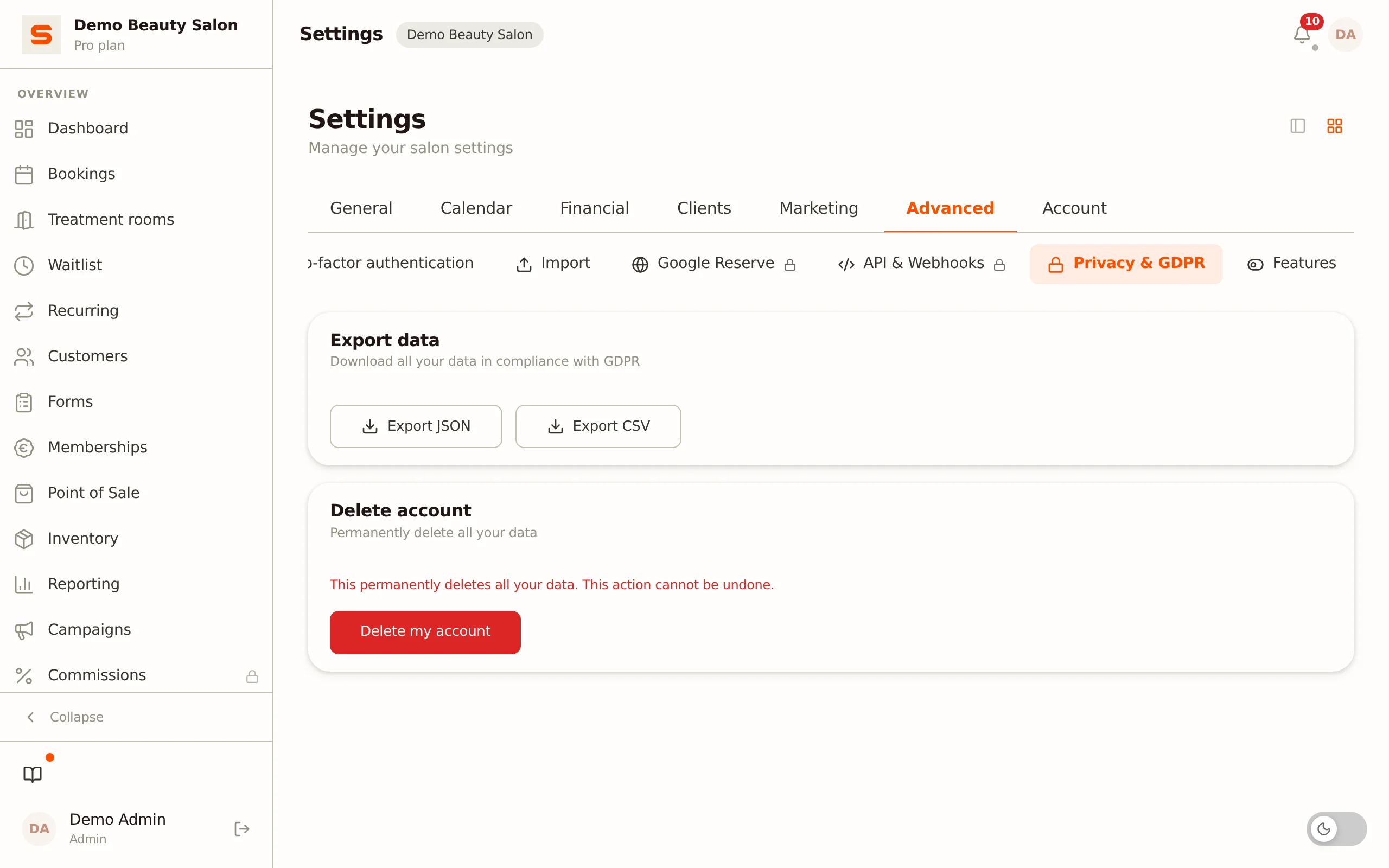
You can also export a complete copy of all your salon data at once -- not one client, but your full administration. You do this in Settings:
- Go to Settings.
- In the Advanced group, open the Privacy & GDPR section.
- Click Export JSON for a full export, or Export CSV for a flat client list.
The JSON export contains all your tables: clients, appointments, staff, products, receipts, gift cards, settings, and more. Health notes from the secure vault are deliberately not included; you export those per client (see above). This is useful for your own records, when switching systems, or for compliance purposes.
This account-level export is also recorded in the Audit Log, so you can later prove who downloaded an export and when.
Deleting your Salonnare account
In the same Privacy & GDPR section you can submit a request to delete your entire account:
- Go to Settings > Privacy & GDPR.
- Click Delete my account and confirm in the dialog.
The 30-day grace period
- After the request, a 30-day grace period starts. During this period your account is marked for deletion, but not yet erased.
- Change your mind? Click Cancel deletion to fully restore your account.
- Only after 30 days is your salon data permanently removed.
During the grace period you can still download a full data export, so you keep a copy of everything before it's gone for good.
The 30-day grace period applies to deleting your salon account. Deleting an individual client is immediate (the client disappears from your lists right away); there is no account-wide grace period for that.
How long is data kept?
| Type of data | How long it's kept |
|---|---|
| Personal client data | Until the client or you request deletion |
| Appointment data | Kept as records, decoupled from personal data after deletion |
| Financial data | At least 7 years (legally required for tax) |
| Health notes (vault) | Stored encrypted, with automatic cleanup after the retention period |
Data processing agreement
Salonnare processes data on your behalf. You can read the data processing agreement at salonnare.com/en/dpa. If you need a signed copy for your records, request it via Support.
Keep it simple
Privacy compliance doesn't have to be complicated. Three habits that keep you on the right side:
- Only collect what you need -- don't fill in every field for every client.
- Respond quickly to data requests -- the export button makes it a matter of clicks.
- Review your client list regularly and clean up old records.
Want to check who downloaded exports? See the Audit Log. For more on managing your clients, see Managing clients.