

SEO stands for Search Engine Optimization. It is everything that helps people find your salon when they search in Google for something like "hairdresser in [your city]" or "gel nails near me". The higher you appear in the search results, the more new clients reach your online booking page.
You don't need to be a marketing expert. This page explains how SEO works and how Salonnare helps you get found.
Why does SEO matter for a salon?
Most people now search online before they book. If you rank well in the results, then:
- new clients find you without you paying for ads;
- they can book an appointment online right away;
- you come across as trustworthy, especially combined with good reviews.
How Google judges your salon
Google looks at things like:
- Relevant text: are your services and city clearly on your page?
- A good title and description: this is what people see first in Google.
- Speed and mobile-friendliness: does your page load fast on a phone?
- Trust: reviews, a complete profile and links from other sites.
What Salonnare handles for you
Salonnare is built so that your online booking page and your marketplace profile are technically easy to find: automatically, without any programming on your part:
- Your own booking page is public and can be indexed by Google, with clean URLs, fast loading times and structured data (schema.org) that matches your type of business, such as hair salon or beauty salon, so Google understands what kind of salon you are.
- Marketplace profile: list your salon visibly in the Salonnare marketplace so you can be found that way too.
- Reviews you collect through Salonnare strengthen your credibility.
- Mobile-friendly and fast out of the box: Google rewards that.
Your controls: SEO title and description
Those two fields are part of every plan, including the free plan. If you leave them empty, your booking page uses your salon name as its title.
-
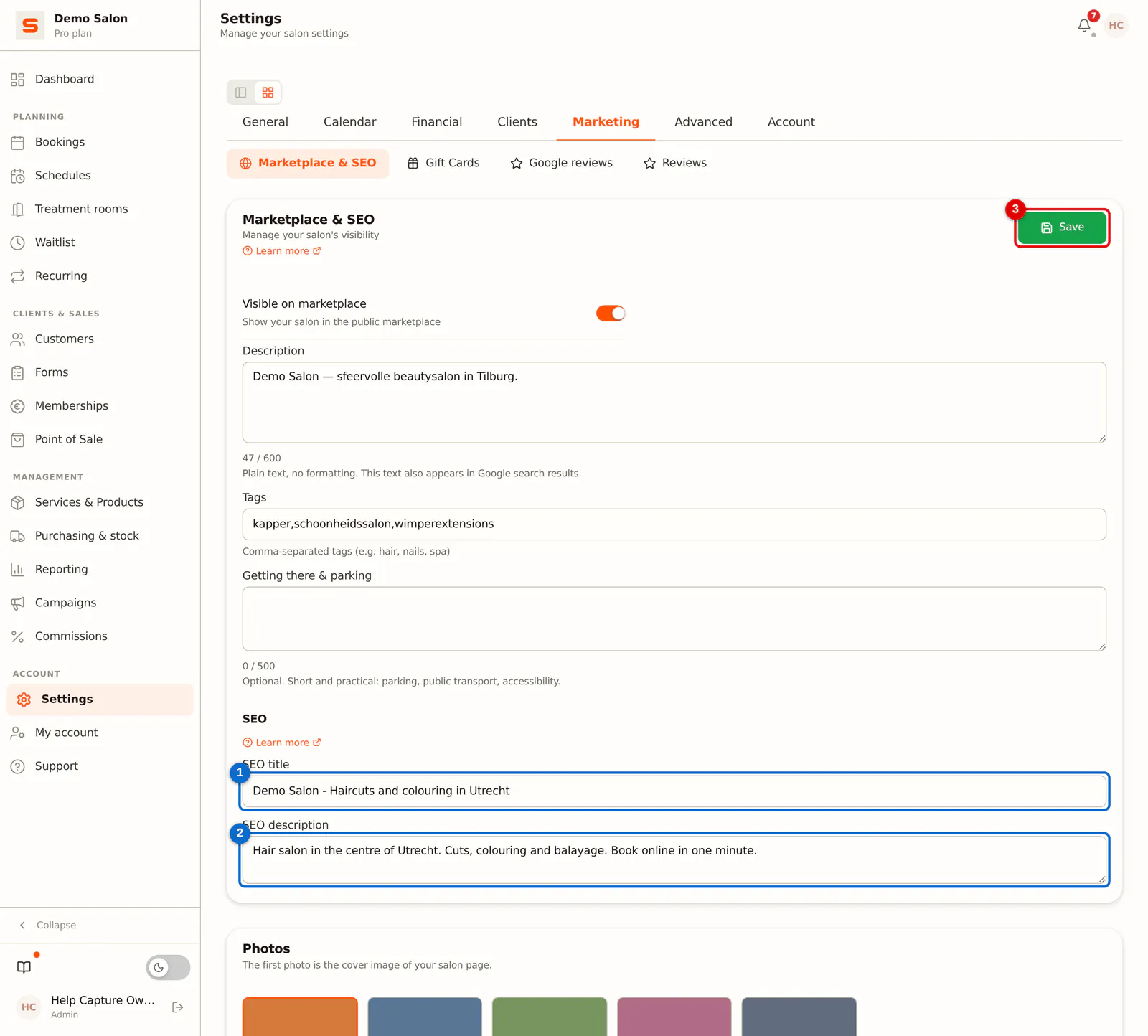
Step 1: Fill in your SEO title and description and save
Go to Settings > Marketing > Marketplace & SEO and scroll to SEO.
- SEO title (1): the title in Google's search results and on the browser tab. Short and clear, with your salon name and city, for example Bloom Hair - Cuts and colour in Utrecht.
- SEO description (2): the short text below the title in Google. Describe in one or two sentences what you do and where, and invite people to book.
Click Save (3).
 (Enlarge image)
Use the words your clients would type themselves ("hairdresser", "nail salon", "gel nails") and always mention your city. That's how Google links you to local searches.
Practical tips
- Complete your marketplace profile fully, with a clear description and tags.
- Collect reviews consistently: ask satisfied clients to leave one.
- Keep your services and prices up to date.
- Share the link to your booking page on your social media and your Google Business Profile.
You get your own indexable booking page on every plan, including the permanently free plan. The marketplace profile and your own SEO texts are included on every plan as well. Want to know more about online booking? Read the article about online bookings.