Client Reviews
Knowing what your clients think is incredibly valuable. Salonnare can automatically ask clients for a review after their appointment, so you get honest feedback without having to chase anyone.
How It Works
Here is the flow:
- A client finishes their appointment and you check it out in the POS, which marks the appointment as completed.
- The next morning at 09:00, in your salon's time zone, Salonnare sends the client an email asking for a review. That moment is fixed, without exception; see When the Request Goes Out.
- The client clicks the button in the email and always lands on a Salonnare page first. What they see there depends on the Google review link field under Settings > Google reviews:
- If that field is empty, they see a simple Salonnare review form.
- If there is a link in it, they see a short confirmation and are sent on to Google automatically after three seconds. There is also a Go to Google now button.
- On the Salonnare form they give a star rating (1 to 5) and optionally write a comment. Under Add more? (optional) they can also give separate scores for ambiance, staff and hygiene, and they can choose to publish their review anonymously.
- They submit, see a thank-you message, and that is it. No account needed.
Because the button always goes through Salonnare's own page first, you can reward reviewing with loyalty points, even when you send clients on to Google. See Loyalty programme.
The whole process is automatic. You set it up once and the reviews keep rolling in.
If there is a Google review link, the review ends up on Google and not in Salonnare. So no review is added under Settings > Reviews, your own average on your salon page does not move, and you get no notification about a new review. If you want to keep your own form, clear the Google review link field.
If you connect your Google Business Profile, Salonnare fills that field in for you when it is still empty. From that moment on your clients are sent on to Google. If you disconnect the profile later, Salonnare clears that link as well: the review request then sends clients back to Salonnare's own review form.
Turning On Review Requests
The review request is an automatic client email, so you switch it on with the other emails: Settings > Email templates.
- Go to Settings in the sidebar.
- Open the Email templates section.
- Turn on the toggle on the Review request row.
There is nothing else to set: the sending moment is fixed (see below). The subject and content of that email are edited on the same row, with the Edit button. See Email templates.
When the Request Goes Out
The review request goes out the morning after the appointment, at 09:00 in your salon's time zone. The time of day the appointment took place makes no difference.
What counts is your salon's calendar day, not the number of hours that have passed. An appointment that ended on Tuesday -- at 09:30, at 19:00 or at 23:45 -- gets its request on Wednesday morning at 09:00.
That holds early in the morning too. If an appointment ends at 08:45, no message goes out at 09:00 that same day; it waits until the next morning. A review request while your client is still on the doorstep is exactly the kind of message that costs you a good review.
It does not matter whether you complete the appointment in the calendar or through the checkout: in both cases the request goes the next morning at 09:00, and never right after completing. If Salonnare completes an appointment afterwards because a paid receipt gets linked to it, no request is sent: that is an administrative correction and it comes without a client email.
Until recently you set a delay in hours here yourself (2 hours by default). That field is gone. With an evening appointment it produced an email late in the evening: an appointment ending at 19:00 sent a message at 21:00. A fixed morning-after slot is predictable and never lands at an awkward moment.
Three things that go with it:
- One request per client, ever. If the same client comes back later, she does not get a second review request. The request is about her most recent visit.
- If processing was down for a while, the round is caught up the same day, until 21:00 salon time at the latest. The request then still arrives later that day instead of not at all.
- If a client does not want review requests, switch off Receive review request after appointment on her client card. She then gets nothing, even while the email is on for the rest of your salon.
Viewing Your Reviews
The reviews that come in are managed in the Settings > Reviews section:
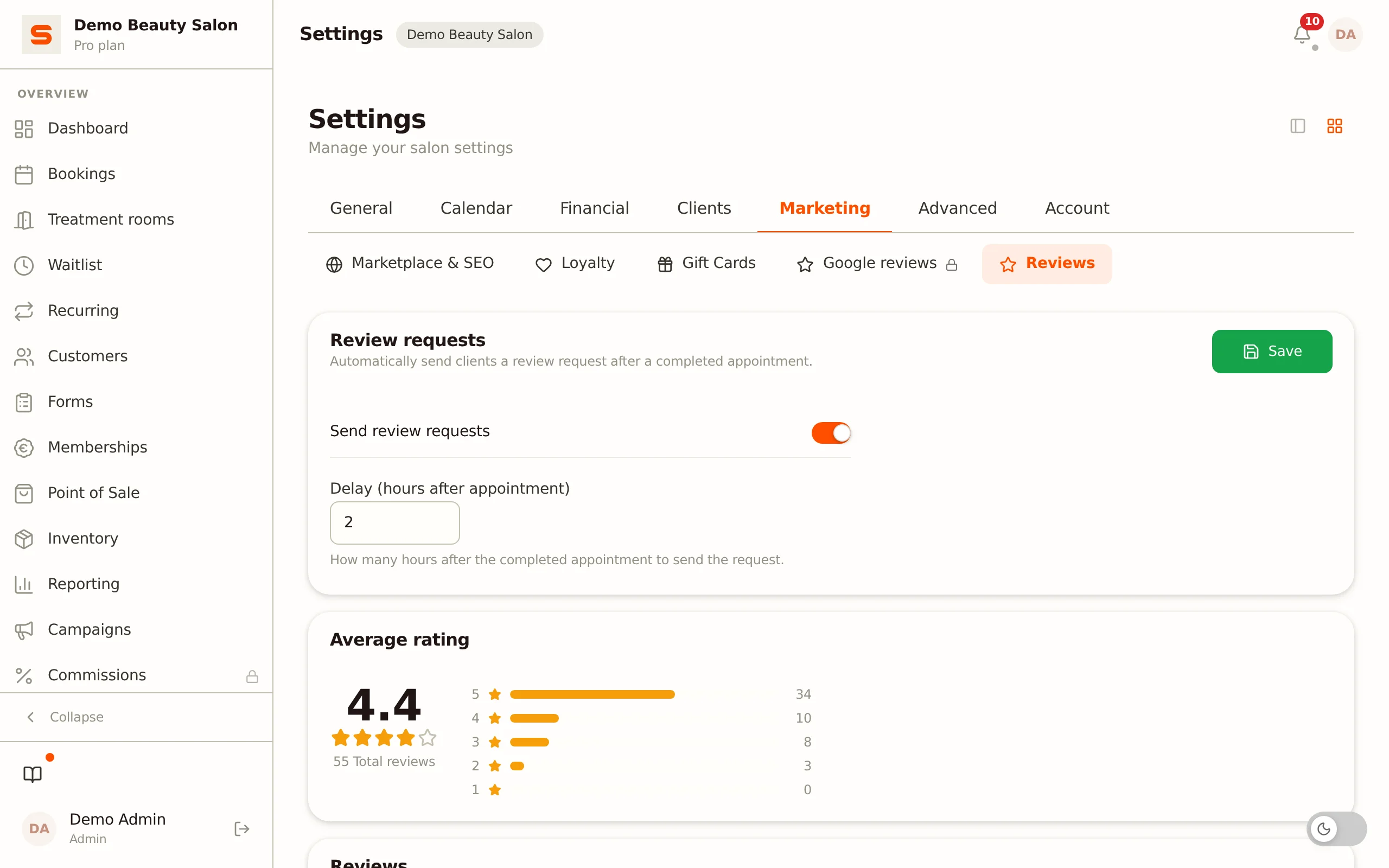
- Average rating -- a card with your average score, the total number of reviews, and the breakdown per star (1 to 5).
- Reviews -- a table of every review received. You can:
- Search by client, service, staff member, or comment.
- Filter by a specific star rating.
- Sort by clicking a column header (rating, client, service, staff, or date).
Each row shows the star rating, the client's name, how that name is shown publicly (Shown publicly as), the service, the team member who performed it, the comment, the status, and the date.
If you have connected your Google Business Profile and Google reviews have been fetched, a Reviews via Google card also appears above the table. It is read-only: you reply to those at Google itself.
Understanding Your Review Stats
The Average rating card sums up your performance:
- Average rating -- your overall score across all reviews.
- Total reviews -- how many reviews you have received in total.
- Rating breakdown -- how many 1-star, 2-star, 3-star, 4-star, and 5-star reviews you have, with a bar per level.
Want to see how your rating develops per period? The Overview tab of your Reports has a Reviews card with the average over the chosen period and the most recent reviews. Click it and you land back here.
If a client gives a low score on the Salonnare form, you get a notification so you can get in touch. You set where that line lies with Alert me at under Settings > Google reviews. You get a notification at the chosen score or lower: if you choose 4 stars and below, a 4 also triggers a notification, and with Every review every score does.
Where Do Clients See Your Reviews?
If your salon is listed in the marketplace, your reviews also appear on your public salon page, under the heading Reviews. Your average rating with the breakdown per star sits at the top, the reviews themselves below it.
Visitors filter that list in the left-hand column:
- Filter by treatment - only the reviews for, say, "Haircut" or "Gel nails". If the appointment contained more than one treatment, the review counts towards each of them.
- Filter by rating - only the reviews with a certain number of stars.
Every review shows which treatment it was about and the first name of the team member who performed it. Because every review belongs to an appointment booked and completed through Salonnare, they appear on your salon page as verified.
If you have connected your Google Business Profile, Salonnare fetches your Google reviews every hour. Only the rating of those reaches your salon page: one line appears at the top of your reviews with your rating on Google, the number of reviews there and a Read them on Google link. The review texts themselves are not shown, they stay at Google. When you connect your Business Profile for the first time, that line is switched on straight away. You switch it off or back on with the Your Google score on your salon page toggle under Settings > Google reviews. If you reconnect later without disconnecting first, your own choice stays as it was.
Leaving out the texts is deliberate: Google's terms do not allow us to show their review texts on our own site. A rating is a fact about your salon, and that is allowed.
Google reviews do not count towards your own average. The rating at the top stays purely about the reviews clients leave through Salonnare; the Google rating sits beside it as a separate second number, exactly as Google reports it. A number that blends two sources says nothing, and Google's terms do not allow us to aggregate their review data either.
If your salon is not listed in the marketplace, your reviews stay visible only to you and your team inside Salonnare, unless you put them on your own website with the review widget.
Reviews on Your Own Website
Under Settings > Google reviews you'll find the block Review widget for your website, with a snippet of code. Copy that code with the copy icon at the top right of the code block and paste it on your own website. Your latest reviews then appear there.
- The widget shows the reviews clients left through Salonnare that include a comment, with stars and text. By default that is the latest five.
- From Google, the widget only shows your score, the number of reviews there and a link to read them on Google. That line only appears if Your Google score on your salon page is switched on and a Google score has been fetched.
- Google review texts are not shown, for the same reason as on your salon page: Google's terms don't allow it.
- The widget speaks your salon's language (Settings > General). Want a different language on a page of your website in another language? Add
data-langto the embed element, for exampledata-lang="en". The options arenl,en,de,frandes; an unknown value falls back to your salon's language.
Replying and Reporting
In the table under Settings > Reviews you have two actions per review:
- Reply - your answer appears below the review on your salon page, marked as a reply from the salon. A short, friendly reply to criticism often does more good than the criticism does harm.
- Report - if you consider a review unfair or inappropriate, give a reason. The report goes to Salonnare, who decides whether the review is hidden.
So you cannot delete or hide reviews yourself. That is deliberate: it is exactly what lets clients trust the rating. The Status column shows where a review stands: Public, Reported or Hidden. A hidden review disappears from your salon page and no longer counts towards your average.
If you want to use your reviews more widely, you can still:
- Copy your best testimonials to your website or social media.
- Ask happy clients for a review on your Google Business Profile. If there is a Google review link under Settings > Google reviews, that already happens by itself: the review request then sends clients on to Google via Salonnare's own page.
Only completed appointments trigger a review request. If an appointment is cancelled or marked as a no-show, no review email is sent.