Your dashboard
The dashboard is the first thing you see after logging in. A quick overview of what your day looks like -- without digging through menus.
Still to come today
At the top of the dashboard, above the KPI cards, sits a full-width chronological list of your own appointments for today that are still to come, showing the start and end time, treatment, client name, and assigned staff member. Each row also shows a status label. The list shows at most five appointments; appointments whose end time has passed drop off. Click View all in the top right of this block to jump to the full calendar.
If nothing is left, the block shows "No bookings today." -- or "No more bookings today." if you did have appointments today but they are all over.
This block only shows appointments assigned to you -- even if you're the owner or an admin. To see your whole team's appointments, use the calendar and set its staff filter to "All staff".
KPI cards
Below the appointment list you'll find a row of overview cards with the key figures. Every card is clickable and takes you straight to the matching section:
- Today's revenue -- today's revenue: paid point-of-sale orders (including a deposit that was applied) plus completed appointments that were not checked out at the point of sale. If a deposit is included in the amount, the card shows below the amount how much of it was deposit. Click to go to Reporting, with the "Today" period already selected -- so you'll see the same amount there. You only see this card if you are allowed to view reporting; a staff member without that permission does not.
- Today's bookings -- the number of your own appointments today (cancelled ones not counted). This counter covers the whole day, including appointments that are already over. Below it you see how many are still to come today ("1 still to come"): exactly the appointments in the Still to come today block. Click to go to your calendar.
- Total clients -- the total number of clients in your database. Click to go to Customers.
- Orders -- the number of recent point-of-sale orders. The dashboard looks at the last five orders for this, so this counter never goes above 5. Click to go to the Point of Sale.
- Reviews -- your average score and the number of reviews received. If you've connected Google reviews, those are included. If you have no reviews yet, it shows "No reviews yet". Click to go to Settings > Reviews.
- Your day at a glance -- opens your personal day dashboard (see below).
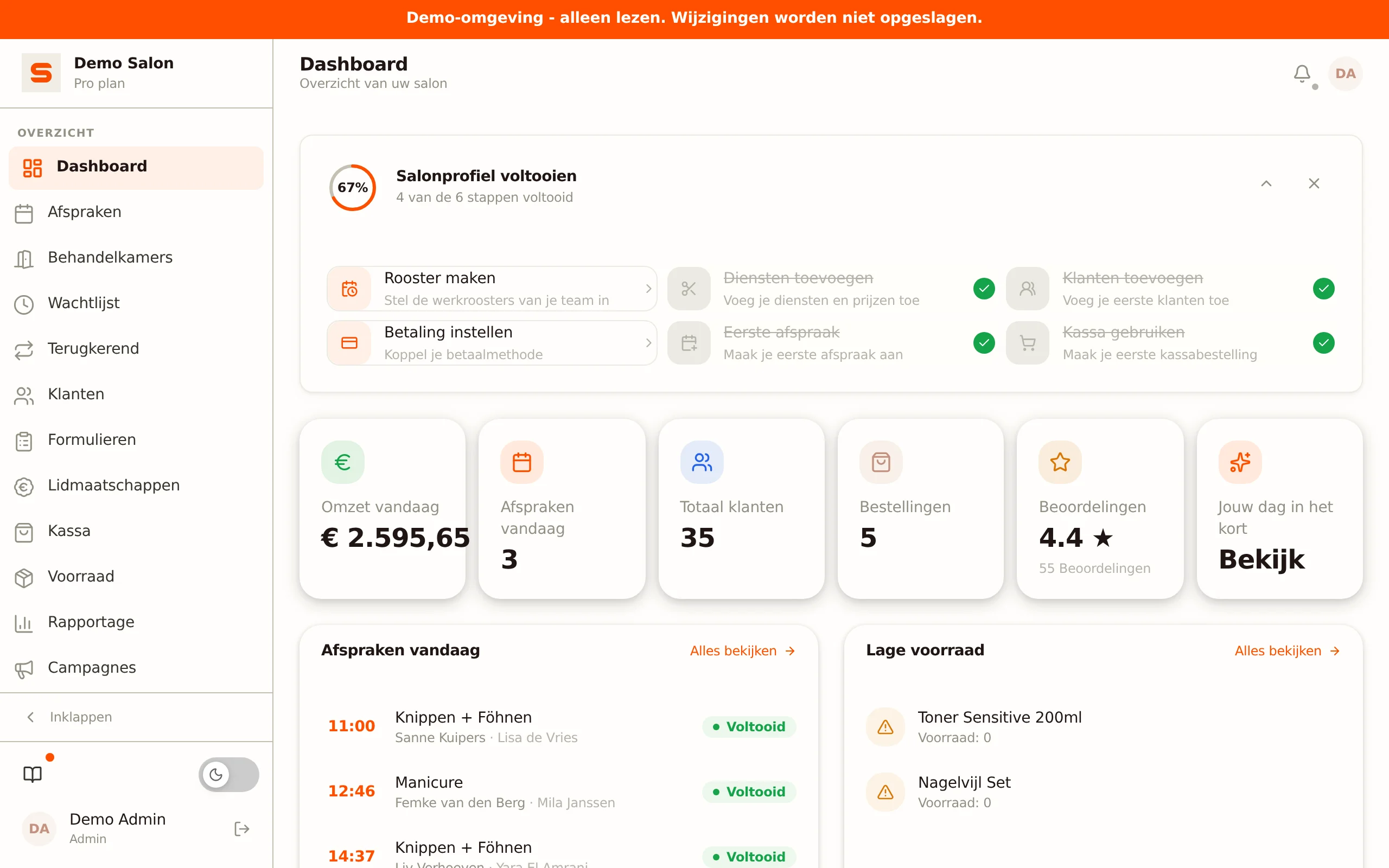
On a very wide screen all six cards sit side by side; on a laptop they're in three columns and on a phone in two.
Revenue forecast
Turn on Revenue forecast under Settings > Features and a block below the KPI cards shows the expected revenue for the next 14 days. Salonnare adds up the prices of every treatment in your booked appointments, per day in your salon's time zone. Provisional and cancelled appointments don't count. The block only appears for people who are allowed to view reports.
Low stock or recent sales
Below the KPI cards there's one more full-width block that adapts to your situation:
- If you have products below their minimum stock level, this block shows Low stock with the first five items that need reordering. A product only counts if you've set a minimum for it and the stock is really below that minimum; exactly at the minimum is not a shortage. Click View all to go to Services & Products, filtered on low stock.
- If there are no low-stock items, this block instead shows Recent sales -- the latest point-of-sale orders with amount, time, and item count. Click View all to go to the Point of Sale.
Daily revenue goal
This card only appears when you turn it on under Settings > Features. It then sits below the KPI cards. Flip the switch (or the one for the revenue forecast) and the dashboard picks it up the next time you open it, on other devices too; you don't need to log in again or reload the page. Like the Today's revenue card, you only see it if you are allowed to view reporting.
- Daily revenue goal -- today's revenue next to the goal you set, with a progress bar and the percentage. Reached it? Then it says Goal reached. The revenue here is the total of today's paid receipts (a refund through a credit note is taken off again). Completed appointments that haven't been checked out yet don't count, so this amount can be lower than the Today's revenue card. Set the goal amount under Settings > Features, right below the switch. Without an amount (0) the card doesn't appear.
The onboarding checklist
As long as your salon isn't fully set up yet, an onboarding checklist with a circular progress indicator sits at the top of the dashboard. It guides you through the first setup steps. Once every step is done (or if you hide the checklist), it disappears on its own. See Getting-started checklist for the full explanation.
Notifications and the notification center
In the top right is the bell icon. It shows a red badge as soon as something needs your attention. Clicking it opens a slide-in drawer: the notification center.
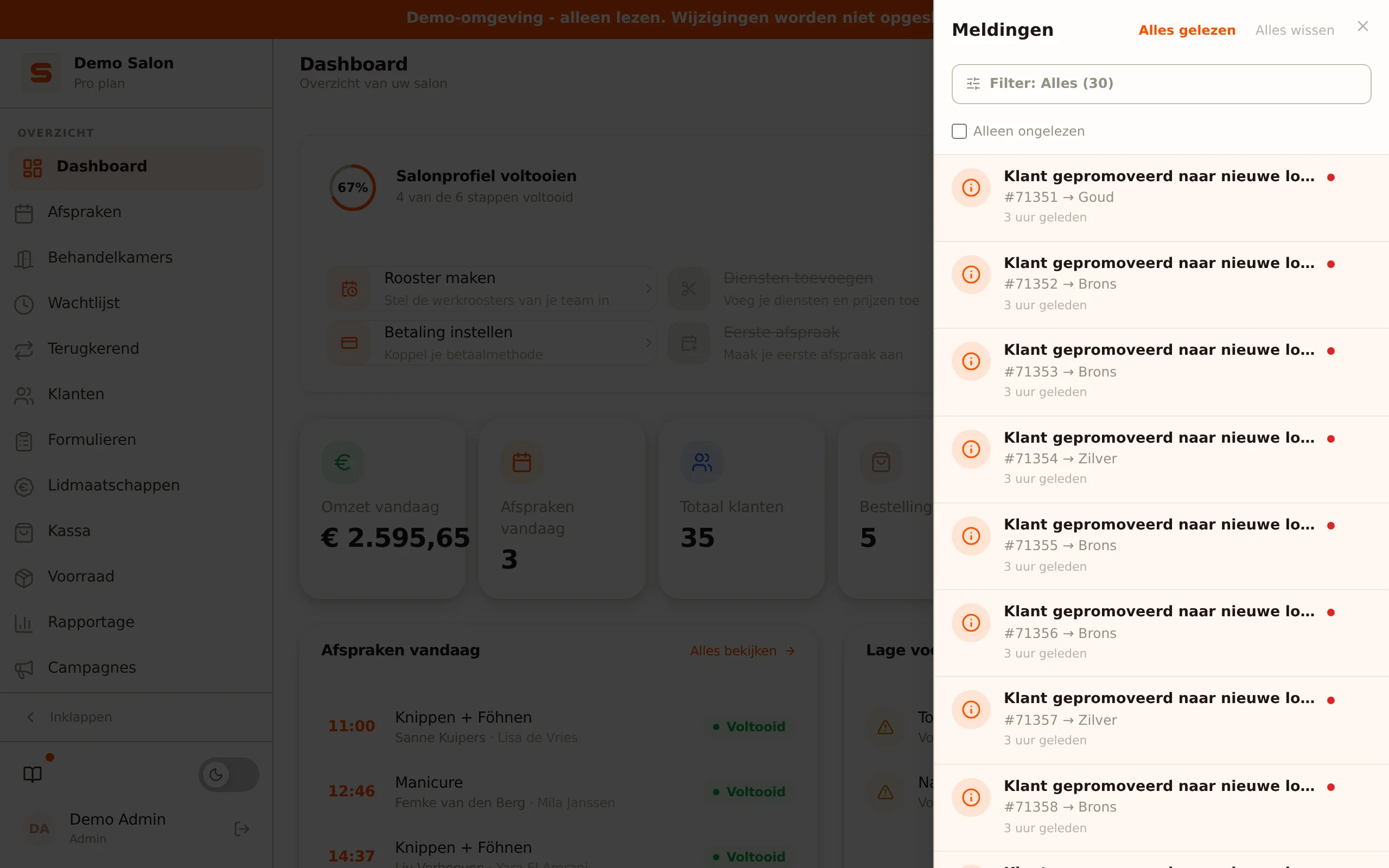
The drawer shows two blocks:
- To handle -- appointments whose end time has passed but that are still scheduled, online bookings that still need a treatment room, and appointments that need a paid receipt linked. The badge number on the bell only counts this block.
- Notifications -- all regular notifications from today and the past few days.
Expand an overdue appointment for a direct action: Checkout opens the point of sale, Completed finishes the appointment, No-show starts the no-show flow and Cancelled cancels the appointment. Open appointment takes you to the appointment in the calendar. After Completed or Cancelled, a message with Undo gives you seven seconds to reverse the action.
Read Notifications for the full story behind the notification center.
Your day at a glance
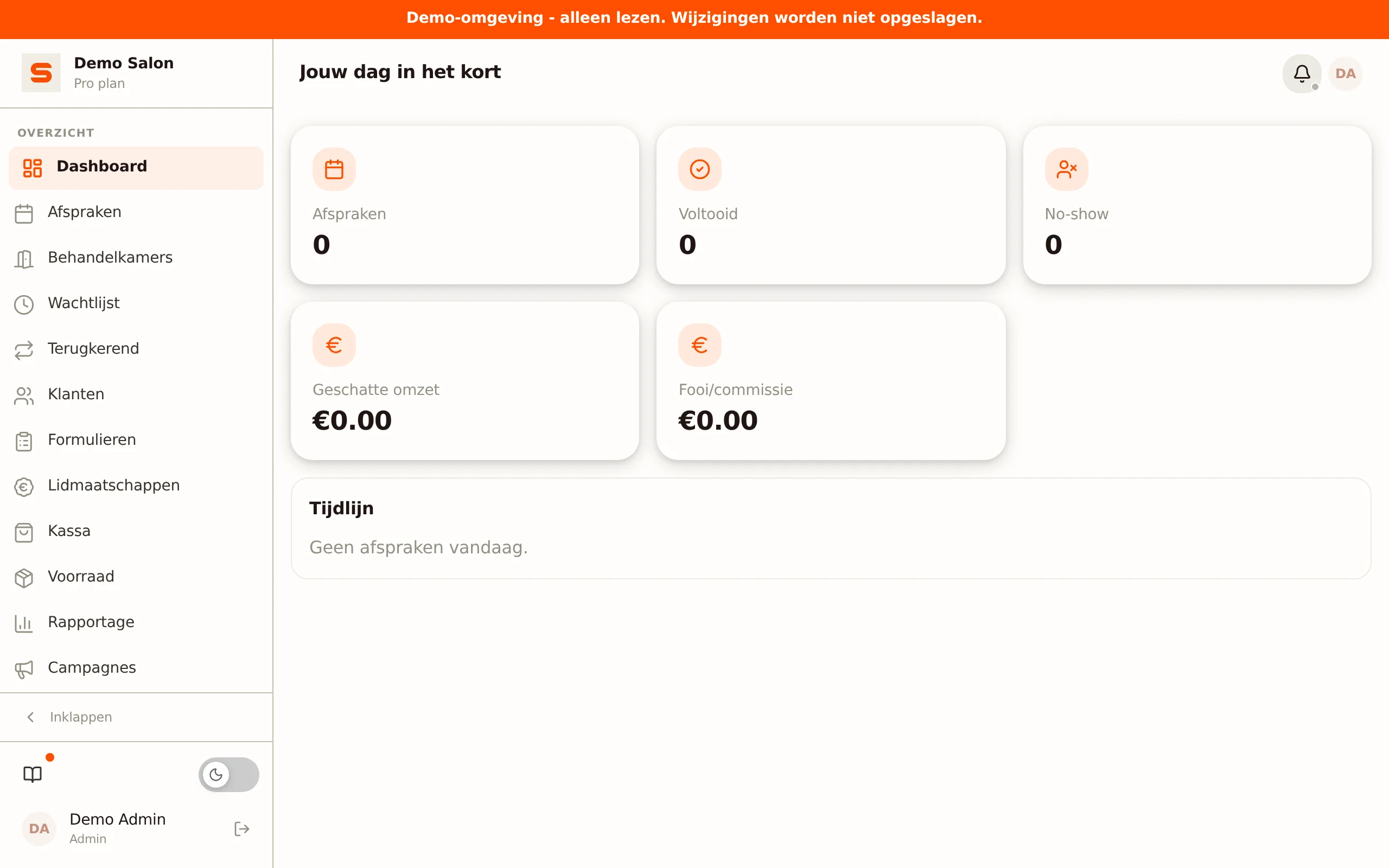
The last KPI card is called Your day at a glance. This card is personal -- it always shows the data of the staff member who is logged in at that moment. Click View to open the personal day dashboard.
This day dashboard goes one step further than the "Today's appointments" block at the top of the page: where that block shows a short list, here you find your whole day, your day KPIs, client signals, and the free time in your calendar.
The day dashboard shows:
- Next appointment -- the time and client of your next appointment.
- Day KPIs -- Appointments, Completed, No-show, Estimated revenue from your own treatments, and Tip/commission.
- Timeline -- all your appointments for today in time order, with time range and duration, client, treatment, and status. Click an appointment to open it in the calendar.
- Client signals -- labels on an appointment: New client (first visit) and Frequent no-show.
- Free and break -- empty slots between your appointments, so you can see when you can take a break or fit something in.
The day dashboard is ideal for a quick look in the morning before your first client walks in. That way you know exactly what's waiting for you.
Company announcements
Sometimes a colored banner appears at the top of the dashboard -- for example about planned maintenance or an important announcement from Salonnare. These banners disappear on their own once the announcement has expired. If your Mollie connection has expired, you'll also see a notice here to reconnect Mollie.
Getting the most out of your dashboard
The dashboard is built as your daily starting point:
- Walk through today's appointments -- who's coming when.
- Scan your KPI cards -- see at a glance how your salon is doing.
- Clear the drawer -- handle the "To handle" items, close individual notifications.
- Keep an eye on the bottom block -- reorder what's almost out or check your recent sales.
Ready for more? Read Managing appointments or dive into your reports.