Refunds and credit notes
Is a client bringing a product back, or was something wrong with a treatment? Then you refund the receipt from the receipt history of the Point of Sale. The original receipt stays as it is. Salonnare adds a credit note next to it: a second receipt with negative lines, dated on the day of the refund.
That way revenue and VAT of the original day never change afterwards. The refund counts in the period in which you make it, and your VAT overview lowers the taxable base in that period.
Who can refund?
- Anyone with the POS permission set to View + edit can refund. An administrator always can. You set permissions per team member, see Staff.
- Only an administrator can give the money back as store credit.
- Only an administrator sees the Refund via Stripe option.
Refunding a receipt
- Open the Point of Sale and click Orders at the top right.
- Click the receipt and then Refund. You can also right-click the receipt (on a phone: long-press) and choose Refund.
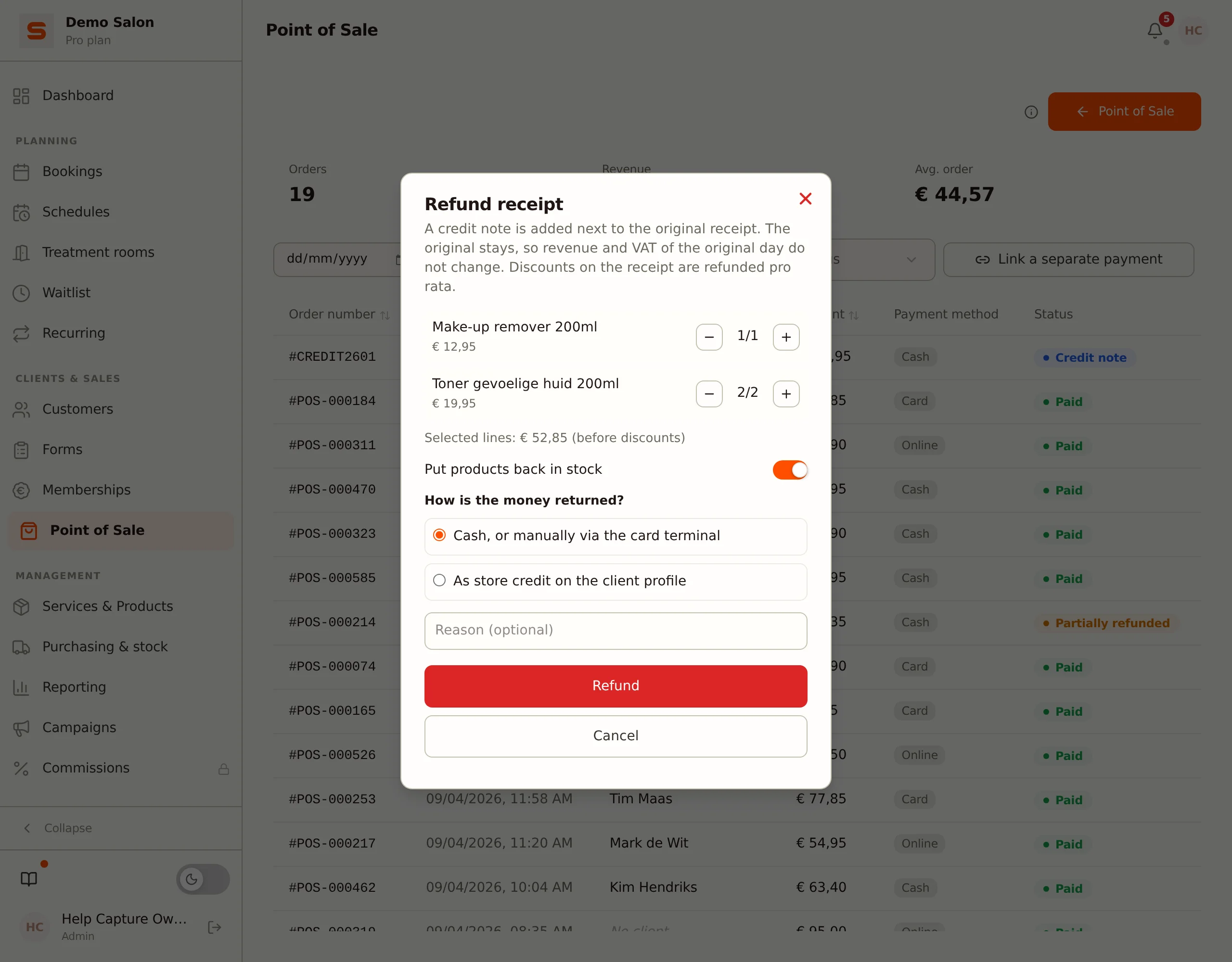
- The Refund receipt window opens. All lines that are still open are already selected, with their full quantity.
- Don't want to refund everything? Lower the quantity per line with the minus button (see Refunding part of a receipt below).
- Choose whether products go back in stock and how the money is returned (see below).
- Optionally fill in a reason. It goes on the credit note and into the client's history.
- Click Refund.
You get a message with the refunded amount. The credit note then appears in the receipt history.
Below the lines, Selected lines shows an amount. That is the amount before discounts. Salonnare calculates the real amount itself: if there was a discount on the receipt, a proportional share of that discount goes along, so the client never gets back more than she paid for those lines. The tip is not refunded.
Refunding part of a receipt
You can choose per line how many items go back. Use the minus and plus buttons to set the quantity; next to it you see how many of that line are still open.
You can refund a receipt in several steps. If part of a line has already been refunded, the window shows it as "already refunded". Together the refunds never exceed the amount of the receipt.
A receipt on which a deposit, a gift card, store credit or a loyalty discount was applied can only be refunded in full. Refunding part of it would return money the client never paid separately. If you try anyway, Salonnare tells you that this receipt can only be refunded in full.
If you sold a gift card on the receipt, that line is not shown in the window. A sold gift card cannot be taken back through a refund: block it instead under Gift cards.
Back in stock
If the lines you refund include a product, you see the Put products back in stock switch. It is on by default: the stock of those products goes up by the quantity taken back, with a stock movement that refers to the credit note.
Turn the switch off if the product can no longer be sold, for example because it has been opened or is damaged.
How is the money returned?
Under How is the money returned? you choose one of these options:
| Option | What happens | When visible |
|---|---|---|
| Cash, or manually via the card terminal | Salonnare records the refund. You return the money yourself: in cash, or with your card terminal. | Always |
| Refund via Stripe | Salonnare automatically refunds the amount on the Stripe payment. | Only for a receipt paid with Stripe through booth rental, and only for an administrator |
| As store credit on the client profile | The amount is added as store credit to the client card. | When you are an administrator, a client is on the receipt and Customer store credit is on |
Did the client pay with a payment link, a Mollie terminal or SumUp? Then Salonnare does not refund the money itself. Make the refund in the dashboard of that payment service and choose Cash, or manually via the card terminal here, so the credit note is in Salonnare too.
If the refund at Stripe fails, the credit note is created but the money has not gone back yet. You get a message about it. Refund the amount yourself in the Stripe dashboard.
What else is reversed
A refund reverses more than just the money:
- Loyalty points -- points the client earned with the receipt are deducted again, proportionally for a partial refund. With a full refund the client gets back any points she redeemed.
- Gift card -- if the receipt was (partly) paid with a gift card, that amount goes back onto the gift card. An empty gift card becomes usable again; a blocked or expired gift card stays that way.
- Deposit -- with a full refund, a deposit that was applied becomes available again.
- Store credit -- store credit the client spent on the receipt goes back to her profile with a full refund.
- Commission -- the commission on the refunded lines is cancelled, even if it was already paid out.
Two things stay as they were. The appointment stays Completed, because the treatment was carried out; only the money goes back. And the use of a discount code still counts towards the maximum of that promotion.
Finding refunds
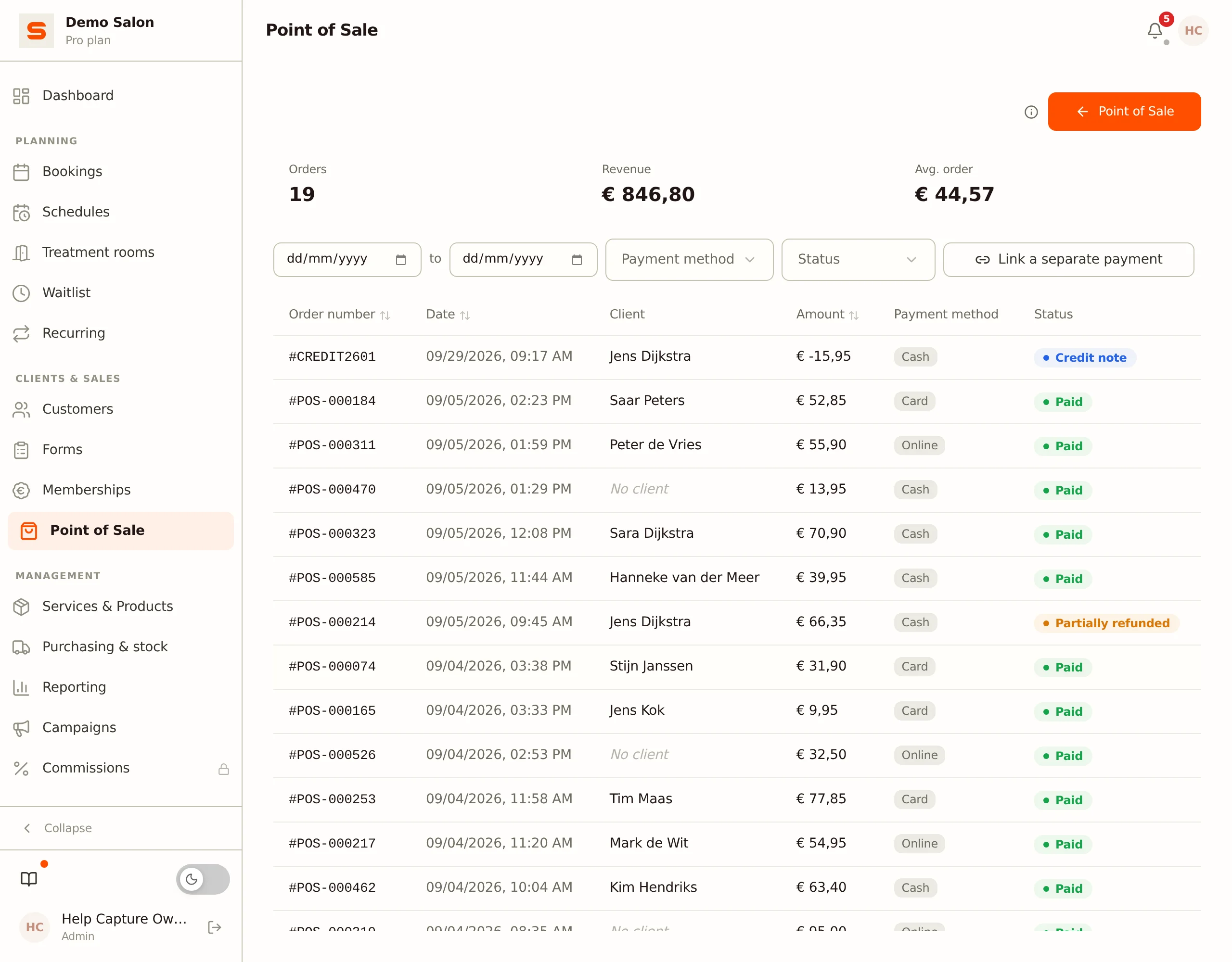
In the receipt history (Point of Sale > Orders) the status shows what happened to a receipt:
- Refunded -- everything on the receipt has been refunded.
- Partially refunded -- part of it has been refunded.
- Credit note -- this is a credit note itself, with a number starting with
CREDIT.
With the Status filter you choose Refunded (receipts of which something was refunded) or Credit note. The revenue at the top of the receipt history is net: a credit note counts with its negative amount. A credit note does not count as an extra order.
If a client is on the receipt, the refund also appears on the client card under Refund history, with the way the money was returned.
What is not possible
- Deleting a paid receipt. You refund a paid receipt; deleting is only possible for a receipt that has not been paid yet.
- Refunding an unpaid receipt. Nothing has been paid yet, so you delete the receipt instead of refunding it.
- Refunding a credit note, or a receipt that has already been fully refunded. The Refund button is then disabled.
- Refunding more than is still open. Per line you cannot select more items than are left.
- Changing amounts on a receipt. You correct an amount with a refund, so a credit note is added next to it.